A reliable PCB starts with a reliable power supply.
Many electronic circuits may appear to work correctly during normal operation but become unstable when the power supply is poorly designed.
Problems such as:
-
- MCU resets
-
- communication errors
-
- unstable digital signals
-
- unexpected shutdowns
-
- Flash programming failures
-
- excessive noise
-
- component overheating
can all be related to power integrity.
For this reason, the power supply section should be treated as one of the most important parts of a PCB design.
1. Basic PCB Power Architecture
A typical controller PCB may have a power structure like this:

The exact architecture depends on the application.
A small battery-powered device may need only one regulator.
An industrial controller may require several voltage rails.
For example:
24 V → 12 V → 5 V → 3.3 V
2. Start With the Input Voltage
The first question should be:
What voltage will the PCB receive?
Examples include:
-
- 3 V battery
-
- 5 V USB
-
- 9 V DC
-
- 12 V DC
-
- 24 V industrial power
-
- Automotive battery voltage
Do not design the regulator based only on the nominal voltage.
Consider the complete operating range.
For example:
Nominal input: 24 V
Minimum input: 18 V
Maximum input: 30 V
The regulator must operate correctly throughout the expected range.
Transient conditions may also need to be considered depending on the application.
3. Calculate the Required Current
The next step is determining how much current the PCB requires.
Suppose the board contains:
| Circuit | Voltage | Current |
|---|---|---|
| MCU | 3.3 V | 80 mA |
| Sensor | 3.3 V | 50 mA |
| RS-485 | 3.3 V | 40 mA |
| Memory | 3.3 V | 20 mA |
| LEDs | 3.3 V | 30 mA |
Total: I_TOTAL =80+50+40+20+30=220mA
But don’t automatically select a 220 mA regulator.
You need operating margin.
For example: I_REGULATOR ≥1.5 × I_TOTAL
Then: I_REGULATOR ≥ 330mA
The actual margin should be determined from the regulator, load profile, temperature, transient requirements, and application.
4. Linear Regulator vs DC/DC Converter
There are two common approaches.
Linear Regulator
Example:
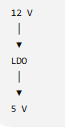
Advantages:
-
- Simple
-
- Low component count
-
- Low noise in many applications
-
- Easy to design
Disadvantage:
Power is dissipated as heat.
For a linear regulator: P_LOSS = (VIN−VOUT) x I
Example: V_IN = 12V, V_OUT = 5V, I = 0.5A
Then: P_LOSS= (12−5) × 0.5 = 3.5W
That’s a significant amount of heat for a small PCB.
5. DC/DC Converter
A switching converter can be more appropriate when the voltage difference or load current is large.
For example:

A switching regulator can achieve high efficiency, but PCB layout becomes more important.
You need to consider:
-
- Switching node
-
- Inductor placement
-
- Input capacitor
-
- Output capacitor
-
- Ground return
-
- High-current loop
-
- EMI
A poorly laid-out switching regulator can create noise even when the schematic is correct.
6. Input Capacitor
The input capacitor is normally placed close to the power-input pins of the regulator.
A simplified layout is:

The physical connection is important.
A long trace between the capacitor and regulator increases parasitic inductance and can reduce the effectiveness of the capacitor at high frequencies.
Therefore:
Place critical bypass and input capacitors as close as practical to the associated device pins.
7. Output Capacitor
The output capacitor helps the regulator maintain a stable output and respond to load changes.

The correct capacitor value and type must come from the regulator manufacturer’s datasheet.
Don’t assume:
“A bigger capacitor is always better.”
Some regulators have specific requirements for output capacitance and ESR.
Always check the recommended application circuit and stability requirements.
8. Decoupling Capacitors
Each digital IC may need local decoupling.
For example:
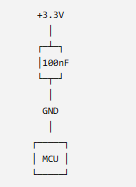
A common approach is to place a small ceramic capacitor close to each IC power pin.
The exact capacitor arrangement depends on the IC and datasheet.
This is especially important for MCUs, memory devices, communication ICs, and other fast-switching digital devices.
9. Why Power Stability Matters
Real-World Engineering Experience
During the development of a main controller unit, I experienced an intermittent startup problem under unstable power-input conditions.
The power reset signal was not stable enough during startup, and the controller sometimes failed to start correctly.
I modified the power-reset circuit and changed the boot-control signal design so that the relevant signals had a defined logic state during power-up.
This experience showed me that reliable digital operation starts with stable power and reset conditions.
10. Power Trace Width
Power traces should be designed according to:
-
- Current
-
- Trace length
-
- Copper thickness
-
- Allowable temperature rise
-
- PCB manufacturer capability
For example, don’t automatically use the same trace width for: MCU signal
and 2 A power rail
They have very different electrical requirements.
Fusion allows designers to define copper-width rules and apply different minimum/preferred widths through Design Rules and net classes.
11. Power Trace Resistance
The voltage drop can be approximated by: V_DROP= I × R
And: R =ρL / A
where:
-
- R = resistance
-
- ρ = copper resistivity
-
- L = trace length
-
- A = copper cross-sectional area
Therefore:
Longer trace → higher resistance
Narrower trace → higher resistance
Higher current → higher voltage drop
This becomes particularly important for:
-
- Motors
-
- Relays
-
- LEDs
-
- Heaters
-
- Solenoids
-
- Industrial controllers
-
- Battery-powered systems
12. Ground Design
Power design is not just about the positive voltage rail.
The return path is equally important.
A simplified system is:
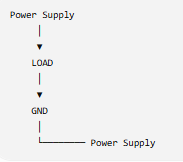
If the ground return path has excessive impedance, the voltage seen by the load can change when current changes.
For digital systems, this can contribute to:
-
- Ground bounce
-
- Noise
-
- Communication problems
-
- Reset problems
-
- ADC errors
A PCB ground plane can help provide a lower-impedance return path, but its layout still needs to be considered carefully.
13. Separate Noisy and Sensitive Sections
A PCB may contain both:
Noisy circuits
-
- Switching regulator
- Motor driver
- Relay
- PWM
- High-current load
and:
Sensitive circuits
-
- ADC
- Sensor
- Reference voltage
- Crystal oscillator
- Communication interface
Don’t automatically place everything together.
A practical layout might look like:

The actual partition depends on the circuit.
The objective is to control current paths and noise coupling.
14. Switching Regulator Layout
This is especially important.
Consider:

The high-current switching loop should generally be kept compact.
Long traces in high-frequency switching paths can increase parasitic effects and EMI.
Therefore:
The switching regulator layout should follow the regulator manufacturer’s recommended PCB layout as closely as practical.
This is one situation where reading the datasheet is more important than simply relying on CAD defaults.
15. Use PCB Design Rules
Before routing the board, establish design rules.
Important rules include:
-
- Minimum trace width
-
- Preferred trace width
-
- Minimum clearance
-
- Via diameter
-
- Drill size
-
- Board-edge clearance
Fusion’s current Design Rules system allows rules to be applied to copper width, clearance, via drill size and other PCB constraints, and DRC checks the completed board against those rules.
This is much better than discovering manufacturing problems after routing is complete.
16. Example: 24 V to 5 V Controller
Let’s put everything together.
Suppose we have:
Input
24 V DC
Output
5 V DC
Load
500 mA
Architecture:
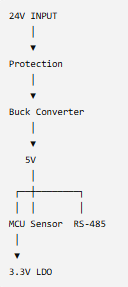
The design process becomes:
Step 1
Determine input voltage range.
Step 2
Calculate maximum load current.
Step 3
Select regulator.
Step 4
Select input/output capacitors according to datasheet.
Step 5
Design power and ground paths.
Step 6
Place power components.
Step 7
Route high-current/switching paths.
Step 8
Add local decoupling.
Step 9
Run DRC.
Step 10
Verify the PCB in 3D.
Step 11
Build a prototype.
Step 12
Measure actual voltage, current, temperature, and noise.
17. Measure the Real PCB
Simulation and DRC are not enough.
After manufacturing the prototype, measure:
DC voltage
Check:
-
- VIN
-
- 5 V
-
- 3.3 V
Current
Measure: ITOTAL
Regulator
☐ Maximum current verified
☐ Thermal dissipation checked
☐ Efficiency considered
☐ Datasheet layout followed
Output
☐ Output voltage verified
☐ Output capacitor selected
☐ Load transient considered
PCB
☐ Power traces sized appropriately
☐ Ground return path reviewed
☐ Decoupling capacitors placed appropriately
☐ Switching loop minimized
☐ Sensitive circuits separated from noisy circuits
Verification
☐ DRC passed
☐ 3D clearance checked
☐ Manufacturing rules checked
☐ Prototype test plan prepared
Conclusion
A reliable PCB begins with a reliable power architecture.
The most important lesson is:
Don’t treat the power supply as just another part of the schematic.
Power affects everything downstream:
Power → Reset → MCU → Digital Signals → Communication → System Reliability
A PCB can have a perfectly correct schematic and still fail because of poor power distribution, inadequate grounding, excessive voltage drop, thermal problems, or an unstable startup condition.
For this reason, power-supply design should be considered from the beginning of the PCB development process—not after the layout is finished.
One Response