Introduction
A PCB may appear to have a stable power supply when measured with a multimeter.
For example, you may measure:
VCC = 3.30 V
But this does not necessarily mean that the power rail is clean.
An oscilloscope may reveal:
-
- Ripple
-
- High-frequency noise
-
- Voltage spikes
-
- Ringing
-
- Startup disturbances
-
- Voltage drop during high-current operation
-
- Switching noise
These power disturbances can cause problems such as:
-
- MCU resets
-
- Communication errors
-
- ADC errors
-
- Flash programming failures
-
- Unstable digital signals
-
- Unexpected system shutdowns
This is why power integrity is an important part of PCB design and troubleshooting.
A power distribution network should maintain a stable voltage over the relevant frequency range of the system’s switching currents.
1. What Is PCB Power Integrity?
Power integrity (PI) describes how effectively a PCB delivers clean and stable power to its electronic components.
A simplified system looks like this:
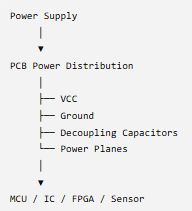
The objective is not simply to have the correct DC voltage.
For example:
3.3 V supply ≠ necessarily clean 3.3 V supply
You also need to consider:
-
- DC voltage
-
- Ripple
-
- Noise
-
- Transient response
-
- Voltage drop
-
- Ground voltage variation
-
- Current demand
2. VCC Ripple
Ripple is a periodic or semi-periodic voltage variation riding on top of the DC voltage.
For example:

The DC voltage may still be approximately 3.3 V, but an oscilloscope could show a ripple waveform.
Ripple is commonly associated with:
-
- Switching power supplies
-
- DC/DC converters
-
- Rectifier circuits
-
- Load changes
-
- Inadequate filtering
3. Ripple Measurement
Suppose the power rail is: 3.3 V DC
You connect an oscilloscope and observe: 3.3 V ± 25 mV
The peak-to-peak ripple is approximately:
VRIPPLE(P−P)=50mV
For example:
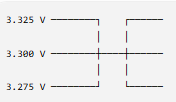
Therefore:
VPP = 3.325-3.275VPP = 50mV
The important point is that the specification should come from the IC, regulator, or system requirements. There is no universal “acceptable ripple” value for every PCB.
4. Why a Multimeter Is Not Enough
A multimeter is excellent for measuring DC voltage.
For example: VCC = 3.301 V
But it may not show a short 50 ns or 500 ns voltage spike.
An oscilloscope can show:

This is particularly important for digital systems.
A short power disturbance can occur when an MCU, processor, memory device, or communication circuit suddenly changes its current demand.
5. How to Measure VCC With an Oscilloscope
A basic setup is:
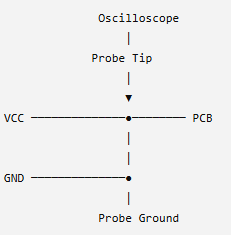
The probe tip connects to VCC.
The ground connection connects to the PCB ground.
However, the way you connect the probe matters greatly.
Keysight specifically notes that shorter ground connections produce more accurate ripple measurements.
6. Avoid the Long Ground Lead
This is one of the most common oscilloscope measurement mistakes.
Poor measurement
VCC ─────── Probe Tip
GND ─────── long wire ───────── Probe Ground
The long ground lead can act like an antenna and add unwanted inductance.
You may see:
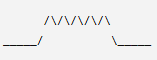
and think:
“My PCB has terrible noise.”
But some of what you see may actually be measurement-induced noise.
Keysight recommends keeping probe and ground connections as short as possible to reduce noise and signal distortion.
7. Use a Ground Spring When Possible
For high-frequency ripple measurements, a short ground spring is often preferable to a long alligator ground lead.
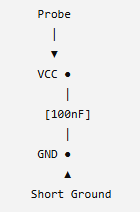
The goal is to minimize the measurement loop.
This becomes increasingly important when measuring fast switching edges and high-frequency noise.
8. Oscilloscope Bandwidth Matters
Suppose your oscilloscope is set to: 20 MHz bandwidth limit
You may not see high-frequency components above that bandwidth.
With bandwidth limit OFF, you may observe:

Therefore, the measurement bandwidth should be selected intentionally.
For a general troubleshooting measurement, you can start with a reasonable bandwidth limit and then increase bandwidth if you need to investigate high-frequency spikes.
Modern power-rail measurements can involve very small signals riding on DC rails, so oscilloscope noise, probe noise, bandwidth, and probing technique all affect the result.
9. AC Coupling for Ripple Measurement
Suppose your VCC is: 5.0 V DC
but ripple is only: 20 mV
Displaying the full 5 V signal can make the ripple difficult to see.
AC coupling removes the DC component from the displayed waveform:
DC + Ripple:
5.02 V ─────────
5.00 V ─────────
4.98 V ─────────
With AC coupling:
+20 mV ──────
~~~~~~~
0 mV ──────
~~~~~~~
-20 mV ──────
This allows you to zoom in on the ripple.
Keysight describes AC coupling as a method for eliminating the DC component when focusing on output ripple measurements.
Important: AC coupling is useful for viewing ripple, but don’t use it as your only measurement. You also need to check the actual DC level and low-frequency behavior.
10. Measuring Power Supply Noise
Noise is different from a clean periodic ripple waveform.
For example:

Noise may originate from:
-
- Switching regulators
-
- Digital ICs
-
- Clock signals
-
- DC/DC converters
-
- Communication circuits
-
- Motors
-
- Relays
-
- External EMI
-
- Poor grounding
-
- PCB coupling
A good troubleshooting approach is to compare the power rail under different operating conditions.
Test 1
System idle:
VCC noise = 8 mV p-p
Test 2
MCU running:
VCC noise = 15 mV p-p
Test 3
Communication active:
VCC noise = 35 mV p-p
This suggests that the noise may be related to the changing system load or communication activity.
11. Measuring Voltage Drop
Voltage drop is another important power-integrity problem.
Suppose a regulator provides: 5.0 V
but the MCU receives: 4.7 V
under high load.
The voltage drop is:
VDROP = 5.0−4.7V_DROP = 0.3V
or:
VDROP = 300mVV_DROP = 300mV
Possible causes include:
-
- PCB trace resistance
-
- Connector resistance
-
- Cable resistance
-
- Via resistance
-
- Insufficient power supply capacity
-
- High load current
-
- Poor grounding
-
- Battery internal resistance
12. Basic Voltage-Drop Calculation
The basic equation is:
VDROP = I × R
Suppose:
I = 2A
and the total resistance is:
R = 0.05
Then:
VDROP = 0.1V
So a 5 V supply could become approximately:
5.0−0.1 = 4.9V
at the load.
13. PCB Trace Resistance
A PCB trace has resistance.
The basic relationship is:

where:

Therefore: Longer trace → higher resistance
and: Wider/thicker trace → lower resistance
This is one reason power traces often need to be wider than ordinary signal traces.
14. Voltage Drop Can Cause Digital Problems
Consider:

If the MCU’s required operating voltage is close to the actual supply voltage, a load transient can potentially cause a reset or malfunction.
For example:

The system may work normally most of the time but fail only during certain operations.
That makes this type of problem particularly difficult to troubleshoot.
15. Measure VCC at Two Locations
This is a very useful practical test.
Measure:
Point A — Power supply output

Then measure the voltage at the MCU.
For example:
Point A = 5.00 V
Point B = 4.82 V
Therefore:
VDROP = 5.00-4.82VDROP = 0.18V
You have now identified a significant voltage difference along the power path.
16. Measure During Maximum Load
This is extremely important.
A PCB may show: 5.00 V at idle
but: 4.70 V during peak load
Therefore, don’t test only when the system is idle.
Test during:
-
- MCU startup
-
- Flash programming
-
- Motor startup
-
- Communication transmission
-
- Relay operation
-
- Maximum CPU activity
-
- Vision-system operation
-
- Maximum system load
The worst-case condition is often more informative than the idle measurement.
17. A Practical Test Example
Imagine a 24 V industrial controller.
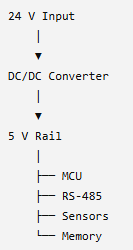
At idle: 5.02 V
During communication: 4.95 V
During maximum load: 4.78 V
Now calculate: VDROP = 5.02-4.78VDROP = 0.24V
That’s a 240 mV change.
The next question is: Where is the voltage being lost?
Measure progressively:

This allows you to locate the problem.
18. Check the Decoupling Capacitors
If the power rail has excessive high-frequency noise, check:
-
- Capacitor value
-
- Capacitor placement
-
- ESR
-
- Ground connection
-
- VCC trace length
-
- Ground-plane connection
-
- Via placement
A capacitor can be electrically correct but physically poorly placed.
TI documentation gives examples where very close placement of a small decoupling capacitor is specified to reduce noise and ripple, with a larger bulk capacitor located nearby.
19. Check the Ground
Sometimes the problem isn’t actually the VCC trace.
It may be the ground path.
Consider:

If significant current flows through a shared ground path:
V = IR
the ground potential can change.
This can create what engineers commonly call ground bounce or ground voltage variation.
Therefore, measure:
VCC relative to the actual local MCU ground.
Don’t assume that every ground point on a PCB is at exactly the same voltage under dynamic conditions.
20. Compare Normal and Abnormal Boards
If you have a working PCB and a failing PCB, this can be one of the fastest troubleshooting methods.
Measure the same points:
| Test Point | Good Board | Problem Board |
|---|---|---|
| DC/DC output | 5.01 V | 5.01 V |
| MCU VCC | 4.98 V | 4.72 V |
| Ripple | 15 mV p-p | 85 mV p-p |
| Reset | Stable | Disturbed |
This can quickly narrow the problem to the power-distribution or reset circuitry.
21. Power Integrity and Your Real-World Controller Experience
This is particularly relevant to your previous controller-development experience.
You experienced an intermittent startup problem where an unstable power-reset signal could prevent the controller from starting.
A useful troubleshooting sequence for that type of problem is:

Instead of immediately assuming:
“The MCU is defective.”
measure the power and reset signals first.
This is a practical engineering lesson:
A digital system cannot be more stable than the power and reset conditions that support it.
22. Troubleshooting Flow
When you encounter an intermittent PCB failure, try this sequence:
Step 1 — Measure DC voltage
Use a multimeter.
VCC = ?Step 2 — Check voltage under load
Idle → Load → Maximum LoadStep 3 — Measure ripple
Use an oscilloscope.
VCC → AC Coupling → VppStep 4 — Check high-frequency noise
Reduce the time scale and examine the waveform.
Step 5 — Check startup
Trigger the oscilloscope during power-up.
Step 6 — Check reset
Compare:
VCC vs RESET
Step 7 — Check ground
Measure local ground differences if appropriate.
Step 8 — Check decoupling
Inspect capacitor value, placement, routing and grounding.
Step 9 — Check PCB power path
Look at:
-
- Trace width
-
- Trace length
-
- Vias
-
- Connectors
-
- Ground paths
Step 10 — Compare with a known-good board
This can dramatically reduce troubleshooting time.
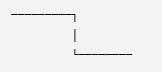
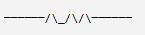
23. What Should You Look for on the Oscilloscope?
When analyzing VCC, don’t look only for ripple amplitude.
Look for:
Ripple

Spike
Ringing
Voltage sag
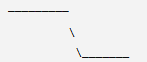
Startup instability
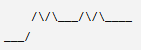
Each waveform can suggest a different type of problem.
24. Measurement Checklist
Before accepting your PCB power design:
-
- Measure DC VCC
-
- Measure VCC at the load
-
- Measure VCC under maximum load
-
- Measure ripple
-
- Check high-frequency noise
-
- Check startup waveform
-
- Check voltage drop
-
- Check reset signal
-
- Check ground
-
- Check decoupling capacitors
-
- Check regulator input/output capacitors
-
- Check power trace width
-
- Check connectors and vias
-
- Compare good vs. failed boards
-
- Verify with an oscilloscope
Conclusion
PCB power integrity is not simply about measuring whether the power supply is 3.3 V, 5 V, or 12 V.
A reliable PCB requires you to understand what happens to that voltage during real operation.
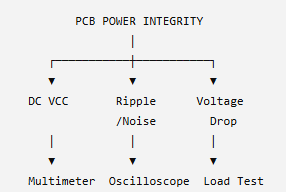
The three fundamental measurements are:
1. DC Voltage
Is the voltage correct?
2. Ripple and Noise
Is the voltage clean?
3. Voltage Drop
Does the voltage remain stable when current increases?
A simple measurement strategy is:
For accurate low-level ripple measurements, the measurement setup itself must not add significant noise or loading. Probe selection, short ground connections, bandwidth, oscilloscope noise floor, and measurement technique can all affect the result.
4 Responses