When designing a PCB, one of the most common questions is:
How wide should a PCB trace be for a given current?
For example:
-
- Can a 0.25 mm trace carry 1 A?
-
- Is a 0.5 mm trace enough for 2 A?
-
- How wide should a 5 A power trace be?
-
- Does 2 oz copper allow a narrower trace than 1 oz copper?
There is no single answer.
PCB trace current capability depends on several factors, including:
-
- Current
-
- Trace width
-
- Copper thickness
-
- Internal vs. external layer
-
- Allowable temperature rise
-
- Trace length
-
- Nearby copper planes
-
- PCB material and thermal environment
IPC-2152 provides guidance for relating conductor size, current, temperature rise, copper weight, and PCB construction.
1. Why Trace Width Matters
A PCB trace is essentially a copper conductor.
Like any conductor, it has resistance.
A simplified equation is:

where:

For a rectangular PCB trace:
A=W x T
where:
- W = trace width
- T = copper thickness
Therefore:
Wider trace → lower resistance
Thicker copper → lower resistance
Longer trace → higher resistance
2. Voltage Drop
Trace resistance creates voltage drop.
The basic equation is

For example, if:
I = 2A
and:
R=0.05Ω
then:
VDROP = 2×0.05V
VDROP = 0.1V
If your power rail is 5 V, the load may receive approximately:
5−0.1 = 4.9V
This may be acceptable—or it may be significant depending on the circuit.
3. Trace Heating
There is another important issue:
Heat.
The power dissipated in the trace is:

For example:
I = 3A
and:
R = 0.05Ω
Then:
P = 32×0.05
P = 0.45W
That 0.45 W is dissipated as heat in the PCB trace.
Therefore, trace width is not simply a matter of whether the copper will “carry” the current.
You also need to determine whether the resulting temperature rise is acceptable.
IPC guidance uses allowable temperature rise as an important part of conductor sizing.
4. Copper Thickness
PCB copper thickness is commonly specified by copper weight.
Typical values include:
-
- 0.5 oz
-
- 1 oz
-
- 2 oz
-
- 3 oz
For reference, 1 oz copper is approximately 35 µm thick, while 2 oz copper is approximately 70 µm. TI documentation gives approximately 1.4 mil for 1 oz and 2.8 mil for 2 oz copper.
A thicker copper layer provides more cross-sectional area.
Therefore:
For the same trace width, thicker copper can carry more current with less resistance and heating.
5. 1 oz vs 2 oz Copper
Consider two traces:
Trace A
-
- Width = 1 mm
-
- Copper = 1 oz
Trace B
-
- Width = 1 mm
-
- Copper = 2 oz
Trace B has approximately twice the copper thickness.
Therefore, its copper cross-sectional area is approximately twice as large.
This can reduce resistance and improve current-carrying capability.
However, this does not mean:
“2 oz copper allows exactly twice the current in every situation.”
The actual thermal behavior depends on the PCB construction and environment.
IPC-2152 considers additional factors such as PCB thickness, nearby planes, thermal conductivity, copper weight, and internal versus external traces.
6. External vs Internal Trace
A trace on the outside layer and a trace buried inside a multilayer PCB do not necessarily have the same thermal behavior.
An external trace has more opportunity to transfer heat to the surrounding environment.
An internal trace is surrounded by PCB material and adjacent copper structures.
Therefore:
External trace ≠ Internal trace
when calculating current capability.
This is one reason why simple online trace-width tables should be treated as estimates rather than universal limits.
7. Example: 1 A Power Trace
Let’s consider a simple example.
Suppose:
Current = 1 A
Copper = 1 oz
Allowable temperature rise = 10°C
A published IPC-2152-based example table gives approximately 10 mil trace width for 1 A under a particular set of assumptions.
10 mil is approximately:
10mil×0.025410
= 0.254mm
So we can say:
Under those specific assumptions, approximately 0.25 mm is an example starting point for 1 A.
But this should not be interpreted as:
“0.25 mm PCB trace always carries 1 A.”
The actual design still needs to consider voltage drop, trace length, PCB construction, temperature, and reliability requirements.
8. Example: 2 A
The same published example table for 1 oz copper and a 10°C temperature-rise target gives approximately 30 mil for 2 A.
Convert:
30mil×0.025430
= 0.762mm
So approximately:
2 A → 0.76 mm
under those particular assumptions.
Notice something important:
Doubling the current did not simply double the required width.
This is because trace heating depends on:

Current has a squared relationship with resistive heating.
9. Example: 3 A
The same example table gives approximately:
3 A → 50 mil
Convert:
50mil×0.025450
= 1.27mm
So:
| Current | Example width | Approx. mm |
|---|---|---|
| 1 A | 10 mil | 0.254 mm |
| 2 A | 30 mil | 0.762 mm |
| 3 A | 50 mil | 1.27 mm |
| 4 A | 80 mil | 2.03 mm |
| 5 A | 110 mil | 2.79 mm |
These values come from a particular IPC-2152-based example for 1 oz copper and 10°C temperature rise. They are not universal design limits.
This distinction is very important.
10. Why “Current Capacity” Tables Can Be Misleading
You may find a table online saying:
1 mm trace → X amps
But without knowing the assumptions, that number isn’t very useful.
You need to ask:
-
- What copper thickness?
-
- External or internal?
-
- What temperature rise?
-
- What PCB material?
-
- What trace length?
-
- Is there a nearby copper plane?
-
- What ambient temperature?
-
- Is the current continuous or intermittent?
-
- Is voltage drop acceptable?
IPC-2152 takes several of these physical factors into account.
11. Voltage Drop Can Become the Real Limitation
This is an important practical engineering point.
Suppose a trace can thermally carry 5 A.
That does not automatically mean it is suitable for your design.
Imagine:
24 V supply
5 A load
Long PCB trace
The trace may stay within the desired temperature rise while still producing an undesirable voltage drop.
Therefore, there are actually two different questions:
Question 1
Can the trace safely carry the current?
Question 2
Is the voltage drop acceptable?
Both need to be checked.
TI design guidance also notes that conductor sizing needs to consider voltage drop in addition to temperature rise.
12. Practical Example: MCU Power
Suppose an MCU requires:
3.3 V / 300 mA
This is relatively modest.
A typical PCB may use a relatively narrow power trace.
But consider:
Motor driver:
24 V / 5 A
This is very different.
You may need:
-
- Much wider traces
-
- Larger copper area
-
- 2 oz copper
-
- Copper pours
-
- Multiple vias
-
- Shorter current paths
-
- Thermal considerations
Therefore, don’t use the same routing strategy for:
MCU power
and
motor power.
13. Copper Pour Can Help
Instead of routing a narrow trace:
───────────────
████████████████████
████ POWER POUR █████
████████████████████
This can significantly increase the copper cross-sectional area and reduce resistance.
Power planes or pours can therefore be useful for higher-current PCB sections.
However, the actual current distribution should still be analyzed, especially around bottlenecks, vias, neck-down regions, and connectors.
14. Don’t Forget the Via
This is one of the most overlooked issues.
Suppose your power trace is:
2 mm wide
but the current passes through one small via.
2 mm TRACE
══════════════
│
● VIA
│
══════════════
The via may become the limiting point.
Therefore:
The entire current path must be checked—not just the trace width.
Check:
-
- Trace
-
- Via
-
- Pad
-
- Connector
-
- Plane
-
- Component lead
-
- PCB copper
A wide trace connected to an undersized via does not create a high-current path.
15. Multiple Vias
For higher-current connections between layers, multiple vias can be used.
POWER PLANE
════════════════════
● ● ● ●
════════════════════
POWER TRACE
Multiple vias can reduce the effective resistance and distribute current.
The actual number and size should be determined from the current, PCB fabrication rules, thermal requirements, and reliability requirements.
16. Trace Width and Signal Integrity
Trace width isn’t only about current.
For high-speed signals, changing the trace geometry can affect impedance.
For example:
-
- USB
-
- Ethernet
-
- CAN
-
- DDR
-
- high-speed clocks
-
- RF signals
may require controlled impedance.
In these cases, simply making the trace “wider” is not necessarily better.
The designer needs to consider:
-
- Trace width
-
- Copper thickness
-
- Dielectric thickness
-
- Ground-plane distance
-
- Differential spacing
This is another reason PCB design should consider the entire stackup.
17. Practical Rule for PCB Designers
A useful engineering workflow is:
Step 1
Determine maximum current.
Step 2
Determine copper thickness.
Step 3
Determine allowable temperature rise.
Step 4
Calculate or estimate required trace width using appropriate IPC guidance.
Step 5
Check voltage drop.
Step 6
Check trace length.
Step 7
Check vias and connectors.
Step 8
Check thermal behavior.
Step 9
Review the complete current path.
Step 10
Prototype and measure when the design is important.
18. Example: 24 V Industrial Controller
Consider a controller PCB:
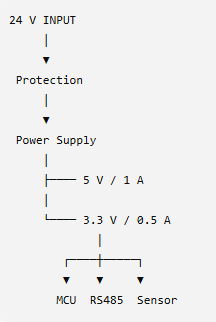
The 24 V input may carry more current than the 3.3 V MCU rail.
Therefore, the PCB could use:
24 V input
→ wider copper
5 V power
→ medium-width trace
3.3 V MCU
→ narrower power trace
Digital signals
→ routing based primarily on signal-integrity requirements
This is a much better approach than assigning one trace width to every net.
19. PCB CAD Design Rules
Modern PCB CAD tools allow different trace widths for different nets.
For example:
POWER_24V → 2.0 mm
POWER_5V → 1.0 mm
POWER_3V3 → 0.5 mm
MCU_SIGNAL → 0.20 mm
HIGH_SPEED → calculated impedance
These values are only examples.
The actual values must be calculated from the specific design.
In Autodesk Fusion, PCB design rules can be used to define different copper-width requirements for different nets.
20. My Practical Engineering Approach
For a small engineering project, I would divide PCB routing into three groups.
Group 1 — Power
Examples:
-
- 24 V
-
- 12 V
-
- 5 V
-
- 3.3 V
-
- Motor power
Focus on:
Current + heating + voltage drop
Group 2 — Normal signals
Examples:
-
- GPIO
-
- LED
-
- Button
-
- Slow sensor signals
Focus on:
Noise + routing + return path
Group 3 — High-speed signals
Examples:
-
- USB
-
- Ethernet
-
- high-speed clocks
-
- fast differential signals
Focus on:
Impedance + return path + signal integrity
This classification makes PCB layout much easier to manage.
21. Important Lesson
One of the biggest mistakes in PCB design is asking:
“How many amps can this trace carry?”
A better question is:
“What trace geometry gives me acceptable temperature rise, voltage drop, and reliability for this application?”
That’s the engineering approach.
The trace needs to satisfy both:Thermal Requirement\boxed{\text{Thermal Requirement}}
andElectrical Requirement\boxed{\text{Electrical Requirement}}
while also considering:Manufacturing Requirement\boxed{\text{Manufacturing Requirement}}
PCB Trace Width Checklist
Before finalizing a PCB:
☐ Maximum current determined
☐ Continuous vs peak current identified
☐ Copper thickness verified
☐ External/internal layer identified
☐ Allowable temperature rise defined
☐ Trace width calculated
☐ Voltage drop checked
☐ Trace length checked
☐ Vias checked
☐ Connector current rating checked
☐ Copper pour/plane considered
☐ Thermal conditions considered
☐ PCB manufacturer capability verified
☐ DRC rules configured
Conclusion
PCB trace width should never be selected from a single universal table.
The correct design depends on:
Current
Copper thickness
Temperature rise
Voltage drop
Trace length
PCB construction
Vias and connections
The IPC-2152 methodology is a useful starting point for relating these parameters, while actual product designs should also consider the complete thermal and electrical environment.
For a simple PCB, a conservative trace-width choice may be sufficient.
For an industrial controller, power supply, motor driver, battery system, or high-current product, however, the complete current path should be analyzed.
A PCB trace is not just a line on the screen. It is an electrical conductor with resistance, inductance, heat, and voltage drop.
That is the mindset that leads to reliable PCB design.
2 Responses