A Practical Guide for Electronics Engineers, Industrial Facilities, IT Systems, and Small Businesses
Introduction
Unexpected power interruptions, voltage fluctuations, and electrical disturbances can cause serious problems for electronic equipment and industrial control systems.
A power interruption may stop a production process, interrupt a computer system, corrupt data, or cause a controller to restart unexpectedly. In some applications, even a brief interruption can create a significant operational problem.
An Uninterruptible Power Supply (UPS) provides backup power when the normal electrical supply fails. Depending on its design, a UPS can also help protect connected equipment from certain voltage disturbances and power-quality problems.
However, selecting a UPS is not simply a matter of choosing a model with a large wattage rating. The engineer must evaluate the connected load, power factor, startup current, required backup time, battery condition, installation environment, and the type of electrical disturbance that needs to be addressed.
This guide explains how to select, size, install, and maintain a UPS system using practical engineering calculations and real-world considerations.
1. What Is a UPS System?
A UPS is a power-protection system that supplies temporary electrical power when the primary power source becomes unavailable or unsuitable for the connected load.
Typical applications include:
-
Industrial control systems and PLCs
-
Embedded controllers and machine-vision equipment
-
Servers, network switches, and communication equipment
-
Laboratory instruments and test equipment
-
Manufacturing equipment that requires controlled shutdown
-
Computers and critical data-processing systems
-
Security, monitoring, and communication systems
A UPS may provide several functions, depending on the model:
-
Temporary backup power during an outage
-
Protection against selected voltage disturbances
-
Power conditioning or voltage regulation
-
A controlled opportunity to save data or shut down equipment
-
Monitoring and alarms for power failures and battery problems
A UPS does not automatically solve every power-quality problem. Its protection capabilities depend on the topology, specifications, installation, and the electrical disturbance involved.
2. Understand the Three Main UPS Topologies

Choosing the appropriate UPS topology is an important first step.
2.1 Standby or Offline UPS
A standby UPS normally supplies utility power directly to the connected equipment and switches to its inverter when the utility supply fails or crosses a defined threshold.
Advantages
-
Usually economical
-
Suitable for many desktop computers and basic electronic loads
-
Generally simple to install
Limitations
-
Transfer time occurs when switching to battery operation
-
Limited power conditioning compared with some other topologies
-
Not ideal for every sensitive or continuously operating load
Typical applications include home computers, small office equipment, and noncritical electronic devices.
2.2 Line-Interactive UPS
A line-interactive UPS commonly includes voltage regulation, often using an automatic voltage regulation (AVR) function, to correct certain overvoltage and undervoltage conditions without always switching to battery operation.
Advantages
-
Useful for locations with frequent moderate voltage variations
-
Can reduce unnecessary battery cycling
-
Often provides a practical balance of cost and protection
Limitations
-
Transfer time may still occur
-
Voltage regulation is not the same as complete isolation from every power disturbance
-
Performance varies by product
Typical applications include small servers, networking equipment, workstations, and some control systems.
2.3 Online Double-Conversion UPS
An online double-conversion UPS converts incoming AC power to DC and then generates AC output through an inverter during normal operation. The inverter normally supplies the load continuously.
Advantages
-
Very short or effectively zero transfer interruption for the specified normal operating mode
-
Strong control of output voltage and frequency within the unit’s specifications
-
Often appropriate for sensitive loads and critical systems
Limitations
-
Higher initial cost in many product categories
-
Conversion losses and heat generation
-
Cooling, maintenance, and battery replacement require planning
Typical applications include critical servers, communication infrastructure, sensitive instrumentation, and selected industrial control systems.
Important: An online UPS does not automatically provide galvanic isolation. Isolation depends on the actual circuit topology and whether an appropriate isolation transformer is provided.
3. Step One: Identify the Equipment That Must Remain Powered
Before calculating UPS capacity, define exactly which loads require backup power.
Do not automatically connect every piece of equipment to the UPS. Some equipment may not need backup power, while other loads may have high startup current or special power requirements.
Create a load inventory.
| Equipment | Quantity | Rated Power per Unit | Priority |
|---|---|---|---|
| Industrial controller | 1 | 80 W | Critical |
| PC or industrial computer | 1 | 150 W | Critical |
| Network switch | 1 | 25 W | Critical |
| LCD monitor | 1 | 40 W | Optional |
| Printer or heater | 1 | 300 W | Usually separate |
The values above are illustrative examples, not specifications for a particular installation.
In this example, if the controller, PC, network switch, and monitor require backup power, their total load is:
P=80+150+25+40
P=295W
If the printer or heater is not required during an outage, it should normally be excluded from this backup-load calculation.
This approach avoids paying for unnecessary UPS capacity and reduces the chance of connecting a load that significantly shortens battery runtime.
4. Step Two: Calculate the Required UPS Capacity in Watts and VA
UPS capacity is commonly expressed in two units:
-
Watts (W): Real power consumed by the load.
-
Volt-amperes (VA): Apparent power supplied by the UPS.
For a load with known real power and power factor:
VA= W / PF
where (PF) is the power factor.
For example, if a connected load consumes 295 W and has a power factor of 0.90:
VA= 295 / 0.90 = 328
The UPS must satisfy both its watt rating and its VA rating. A UPS rated at 500 VA is not necessarily capable of supplying 500 W.
Add an Engineering Margin
A practical preliminary design may add 20–30% capacity margin to accommodate load variation and future expansion. The appropriate margin depends on the application and the manufacturer’s sizing guidance.
Using a 25% margin:
P = 295 x 1.25
P = 368.75 W
The preliminary apparent-power requirement at a power factor of 0.90 is:
S = 368.75 / 0.90
S = 410 VA
A UPS with ratings above approximately 369 W and 410 VA would satisfy this preliminary steady-state calculation.
However, this is not yet a final selection. The actual UPS must also support the required runtime, startup current, load characteristics, voltage, frequency, and environmental conditions.
Practical Selection Rule
Select a UPS only after checking both limits:
P = P_max
S = S_max
Do not use the VA rating alone to determine whether a UPS can support a particular load.
5. Step Three: Calculate Battery Backup Time
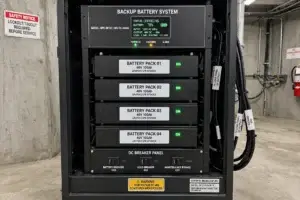
UPS capacity and battery runtime are two different design requirements.
A UPS may have enough output power to support a load but may not provide backup for the required duration.
For example, a control system may need only 10 minutes of backup to save data and shut down safely. A communication system or critical production process may require a longer runtime or an external battery pack.
Practical Battery Energy Calculation
A preliminary estimate of battery energy is:

where:

For a 300 W load requiring 15 minutes of backup:


This means the load needs 75 Wh of energy at its output during the 15-minute period.
However, the battery must supply more energy than this because of inverter losses, battery discharge characteristics, temperature, aging, and other system losses.
A simplified preliminary estimate is:

where:

For illustration, assume 90% conversion efficiency and 80% usable battery energy:

This is an energy estimate, not a final battery specification. Real battery runtime should be verified using the UPS manufacturer’s runtime curves for the intended load, battery configuration, temperature, and end-of-life assumptions.
The actual battery sizing can be more complicated because battery capacity in Ah is affected by discharge rate, cutoff voltage, temperature, and battery chemistry.
Practical recommendation: Use the manufacturer’s published runtime chart or sizing tool for final selection rather than relying only on a Wh calculation.
6. Step Four: Select the UPS for the Required Application
The following examples illustrate how application requirements affect UPS selection.
|
Application |
Preliminary Selection Direction |
Main Considerations |
|---|---|---|
|
Home computer and router |
Standby or line-interactive |
Cost, runtime, automatic shutdown |
|
Small business server |
Line-interactive or online |
Load, runtime, monitoring, transfer behavior |
|
Industrial controller and PC |
Based on power quality and process risk |
Reset behavior, startup load, control-system compatibility |
|
Sensitive laboratory equipment |
Often online double-conversion |
Output quality, grounding, isolation requirements |
|
Critical communication system |
Online or another engineered architecture |
Runtime, redundancy, monitoring, maintenance |
|
Large industrial facility |
Engineered UPS system |
Three-phase load, battery design, bypass, distribution |
These are starting points, not universal rules. The final topology should be selected based on the load manufacturer’s requirements and the consequences of a power interruption.
For an industrial controller, for example, a UPS may prevent a brief outage from interrupting operation. But if the controller is affected by electrical noise, grounding problems, or an unstable reset circuit, the UPS may not resolve the underlying design issue. Those problems may require separate power-integrity, grounding, or reset-circuit improvements.
7. Step Five: Installation Planning
Correct installation is essential for safe and reliable operation.
7.1 Select an Appropriate Location
Install the UPS in a location that meets the manufacturer’s environmental requirements.
Check:
-
Ambient temperature and humidity
-
Ventilation and clearance around air inlets and outlets
-
Dust, moisture, and corrosive contaminants
-
Access for battery replacement and maintenance
-
Mechanical support and floor loading
-
Protection from accidental impact or liquid spills
Batteries can age faster at elevated temperatures. Do not place a UPS next to heaters, in direct sunlight, or in an enclosed cabinet without verifying its cooling requirements.
7.2 Verify the Electrical Supply
Before connecting the UPS, confirm the input voltage, frequency, phase, circuit rating, grounding, and plug or terminal configuration.
In the United States, small UPS units often use nominal 120 V single-phase circuits, while larger systems may use different single-phase or three-phase configurations.
The UPS input circuit must be compatible with the equipment’s nameplate and the manufacturer’s installation instructions.
Do not assume that the output receptacles, input plug, and branch circuit are interchangeable simply because they physically fit.
7.3 Separate Critical and Noncritical Loads
Connect only the equipment that needs backup power to the battery-backed outlets.
For example:
-
Industrial controller: critical
-
Control PC: critical
-
Network switch: possibly critical
-
Printer or heater: usually noncritical
Reducing noncritical loads can increase the time available for essential equipment.
Some UPS models provide separate battery-backed and surge-protection-only outlets. Verify the outlet functions before installation.
7.4 Check Grounding and Wiring
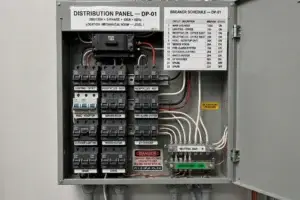
Follow the manufacturer’s wiring and grounding requirements and applicable electrical codes.
Do not remove protective grounding, defeat safety features, or use improvised wiring to connect equipment.
For fixed industrial installations, hardwired UPS systems, bypass arrangements, or three-phase equipment, use qualified electrical personnel. Isolation, overcurrent protection, neutral-ground bonding, and transfer arrangements must be evaluated for the actual installation.
7.5 Plan the Bypass and Maintenance Method
Larger UPS installations may require a maintenance bypass so that the UPS can be serviced without unnecessarily interrupting the protected load.
The bypass design must prevent unsafe operating states and must follow the manufacturer’s instructions and applicable codes. A bypass is not a substitute for safe electrical isolation during maintenance.
8. Battery Safety and Maintenance
UPS batteries are consumable components. Their performance changes over time, and a battery can fail even if the UPS appears to operate normally.
A maintenance plan should include:
-
Regular inspection of alarms and battery status
-
Manufacturer-recommended battery self-tests
-
Review of runtime estimates and event logs
-
Replacement according to condition and manufacturer guidance
-
Inspection for swelling, leakage, corrosion, or abnormal temperature
-
Correct disposal or recycling of replaced batteries
Battery replacement intervals depend on chemistry, temperature, usage, and product design. Do not assume every battery needs replacement at the same age.
Some larger battery systems require dedicated ventilation, protective equipment, and specific installation practices. For example, OSHA requirements address ventilation and other safeguards for certain installations using unsealed batteries. Applicable requirements depend on the battery type, workplace, and installation.
Never open an energized UPS or attempt internal battery repairs unless you are qualified and following the manufacturer’s service procedure. UPS equipment can contain hazardous voltages even after the AC input is disconnected.
9. Commissioning and Acceptance Testing
After installation, verify that the complete system performs as intended.
A practical commissioning checklist includes:
-
Confirm the UPS model, capacity, input voltage, and output configuration.
-
Verify that the connected load is within both the W and VA limits.
-
Confirm that the battery is charged according to the manufacturer’s instructions.
-
Check alarms, indicators, and communication software.
-
Verify that the protected equipment operates normally.
-
Test the intended shutdown or control sequence.
-
Perform a controlled backup test according to the manufacturer’s procedure.
-
Record the measured load, estimated runtime, test date, and results.
Do not perform an uncontrolled mains disconnection on production equipment. Schedule outage testing during an approved maintenance window and establish a recovery plan before beginning.
For computer systems, confirm that automatic shutdown software works correctly. For industrial controllers, verify whether the process should continue running, enter a safe state, or shut down in a controlled sequence.
10. Common UPS Installation Mistakes
Mistake 1: Selecting a UPS by VA alone.
Always check the rated watt output as well as the VA capacity.
Mistake 2: Assuming the battery will last for the advertised maximum time.
Runtime depends on actual load and battery condition. Use the manufacturer’s runtime data.
Mistake 3: Connecting high-inrush loads without checking compatibility.
Motors, laser printers, and other demanding loads can exceed the UPS’s transient capability.
Mistake 4: Ignoring ventilation and temperature.
Poor cooling can reduce reliability and battery life.
Mistake 5: Treating a UPS as a complete surge-protection solution.
Verify the device’s surge, transient, grounding, and power-conditioning specifications for the actual risk.
Mistake 6: Never testing the backup function. A UPS that has not been tested may fail to provide the required runtime during a real outage.
Mistake 7: Forgetting the controlled shutdown plan. A UPS provides finite backup energy. The system must define what happens when the outage lasts longer than expected.
11. Practical Engineering Example: Protecting an Industrial Controller
Consider an industrial inspection system containing:
|
Equipment |
Example Power |
|---|---|
|
Main controller |
80 W |
|
Industrial PC |
150 W |
|
Network switch |
25 W |
|
LCD monitor |
40 W |
|
Total |
295 W |
Assume a 25% planning margin:

At an assumed power factor of 0.90:

This provides a preliminary minimum requirement of approximately 369 W and 410 VA, before checking transient loads, manufacturer’s sizing guidance, and the required runtime.
Suppose the system needs 15 minutes to save data and shut down. The engineer should then select a UPS with sufficient output power and confirm through its runtime chart that it can support the actual load for at least the required duration under the intended battery conditions.
For an industrial installation, the engineer should also evaluate whether the system must continue running during an outage or whether it should stop in a safe and controlled manner.
This distinction matters: the goal of a UPS is not always to keep everything running indefinitely. Sometimes its most important job is to provide enough time for a safe shutdown.
12. Benefits of a Properly Selected UPS
A correctly sized and installed UPS can provide several practical benefits:
-
Reduced interruptions caused by utility outages
-
More time to save data and shut down systems safely
-
Improved availability of critical control and communication equipment
-
Reduced risk of unexpected equipment resets during supported power disturbances
-
Better operational continuity
-
More predictable response to loss of normal power
A UPS cannot guarantee that equipment will never fail or that all power-quality problems will disappear. Its benefit depends on correct sizing, suitable topology, installation quality, maintenance, and the nature of the electrical problem.
Conclusion
Selecting a UPS system requires more than matching a product’s VA rating to a rough estimate of equipment power.
The engineer must identify critical loads, calculate both watts and VA, define the required backup duration, choose an appropriate UPS topology, and verify that the battery can support the load for the required time.
Safe installation, grounding, ventilation, battery maintenance, and commissioning tests are equally important.
For industrial electronics and control systems, a well-designed UPS installation can improve continuity and reduce the risk of uncontrolled interruptions. The best result comes from treating the UPS as part of the complete electrical and control-system design rather than as a standalone accessory.